
Discover
What we do
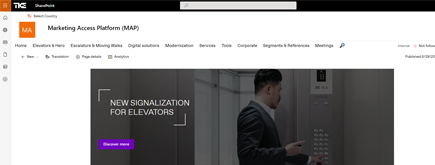
TKE SharePoint rebranding
TKE, a global elevator leader, consulted with NIFTIT to overhaul their SharePoint site for the Asia Pacific team. Enhanced search, mobile usability, and multilingual interface ignited innovation.
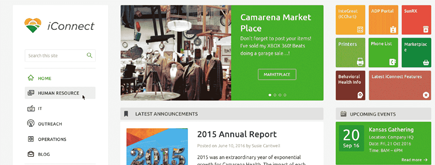
Camarena Health
NIFTIT's expertise in advanced UI/UX design combined with the functionality of Microsoft 365 transformed Camarena Health's digital landscape, driving efficiency and engagement.
The New York Metropolitan Transportation Council (NYMTC)
Discover how NIFTIT improved data access and enhanced collaboration for NYMTC by leveraging SharePoint, optimizing data connections, and orchestrating business automation workflows.
NIFTIT LLC
85 Delancey St, 2nd Floor, New York, NY 10002, USA 1-848-272-0977
How to Give Every Employee an HR Assistant Without Buying Copilot for Everyone
By
 Dom B.
Published 4 hours ago
~5 minute read

Every HR team knows the pattern. Monday brings questions about the holiday schedule. Payroll week brings questions about direct deposit. Open enrollment brings a flood. The answers already exist in the handbook, the benefits guide and a dozen policy documents. Staff just can't find them, so they email HR.
AI assistants can fix this. But for many organizations, the conversation stalls at one question: do we really have to buy Copilot for everyone?
The short answer is no.
The licensing question that stalls HR AI projects
Microsoft 365 Copilot costs $30 per user per month on annual billing. For a 150-person organization, that is $4,500 a month, or $54,000 a year. Microsoft's SMB-focused Copilot Business plan at $21 per user brings that to about $3,150 a month for the same team.
Those licenses can be worth it for people who live in Word, Excel and Outlook all day. But most employees don't need a full AI assistant to find the PTO policy. They need fast, accurate answers to a handful of HR questions a month.
The alternative: one agent, billed by use
Microsoft Copilot Studio lets you build an agent that answers questions from content you choose, such as your HR policy library in SharePoint, and publish it in Teams and on your intranet.
Instead of a per-user license, Copilot Studio is billed by consumption in Copilot Credits. On pay-as-you-go, each credit costs $0.01, billed monthly through your Azure subscription. Different actions use different amounts: a generative answer uses 2 credits, an agent action uses 5, and tenant graph grounding adds 10 credits to each message that uses it.
One more detail matters: staff who already hold a Microsoft 365 Copilot license can use internal agents at no credit cost. So you can license the few people who need full Copilot and serve everyone else through the agent.
What it costs in practice
Take a 150-person organization where each employee asks the HR agent about 8 questions a month, or 1,200 questions in total.
| Agent design | Credits per month | Pay-as-you-go cost |
|---|---|---|
| Generative answers from the HR library | 2,400 | About $24 |
| Same, plus an action (such as a form link or handoff) on 1 in 5 questions | 3,600 | About $36 |
| Generative answers with tenant graph grounding on every message | 14,400 | About $144 |
| For comparison: Copilot Business for all 150 staff | Per-user license | About $3,150 |
These are estimates based on Microsoft's published rates. Real usage depends on how often people ask and how the agent is built. Design choices, not headcount, drive the bill, which is why the build matters as much as the license.
What a good HR agent does, and what it should not do
A well-built HR agent answers questions about policies, benefits, the payroll calendar, holidays, forms and who to contact. It cites the document it used, so staff can check the source. When it is not sure, it says so and points to a person on the HR team.
It should not answer from personal records, such as an individual's leave balance, unless it is deliberately connected to your HR system with the right security. It should not give legal advice. And it should never see confidential HR files in the first place.
Three things to get right before launch
1. Fix permissions first. An agent can only surface what it is connected to, but anything it is connected to is fair game. Before launch, review who can see every library and file the agent reads. Many Microsoft 365 tenants have documents shared far more widely than anyone intended, and an AI assistant makes that oversharing visible in seconds.
2. Curate the content. Keep one approved version of each policy in one library. Archive old handbooks and drafts. An agent that finds three versions of the remote work policy will give three different answers.
3. Set a spending limit. Pay-as-you-go has no ceiling unless an admin sets one. Set a monthly limit and usage alerts on day one, then review actual usage after the first month. If usage settles above about 20,000 credits a month, a prepaid capacity pack of 25,000 credits for $200 a month becomes cheaper.
A 14-day path to launch
This is the approach we use with HR teams:
- Days 1 to 2: List the top 25 questions HR gets, gather the approved documents and agree on branding.
- Days 3 to 9: Build a branded SharePoint HR site, organize the policy library, review permissions and set up the agent on the approved content.
- Days 10 to 13: Test the agent with the HR team against 50 real questions, tune the answers and set spending limits.
- Day 14: Announce it to staff, train the admins who will keep content current, and watch the first month of usage.
The result is one place to find HR information and an assistant that answers in seconds, in the tools your staff already use.
When full Copilot licenses make sense
An HR agent is not a replacement for Microsoft 365 Copilot. If many of your people would use Copilot every day to draft documents, summarize meetings and analyze spreadsheets, licensing them may pay for itself. The two work well together: licensed staff use the agent at no extra usage cost, and everyone else uses it on pay-as-you-go.
The point is that you don't have to make a $50,000 decision to give every employee faster HR answers.
Want to see one in action? NIFTIT's HR and Intranet Agent Launch delivers a branded SharePoint HR site and a Copilot Studio agent in 14 days for a fixed $9,500, with usage billed directly to you by Microsoft. Book a 20-minute demo with our team and we will estimate your monthly usage cost on the call.