
Discover
What we do
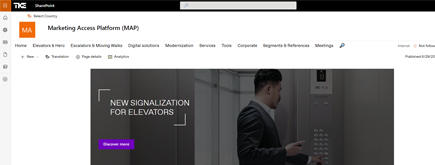
TKE SharePoint rebranding
TKE, a global elevator leader, consulted with NIFTIT to overhaul their SharePoint site for the Asia Pacific team. Enhanced search, mobile usability, and multilingual interface ignited innovation.
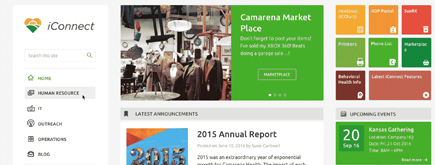
Camarena Health
NIFTIT's expertise in advanced UI/UX design combined with the functionality of Microsoft 365 transformed Camarena Health's digital landscape, driving efficiency and engagement.
The New York Metropolitan Transportation Council (NYMTC)
Discover how NIFTIT improved data access and enhanced collaboration for NYMTC by leveraging SharePoint, optimizing data connections, and orchestrating business automation workflows.
NIFTIT LLC
85 Delancey St, 2nd Floor, New York, NY 10002, USA 1-848-272-0977
How to Build a Hyperautomation Team in Your Small Business to Start Adopting AI
By
 Dom B.
Published 3 hours ago
~9 minute read

Most small business owners we talk to aren't asking whether to use AI anymore. They're asking where to start, and who on their team should own it.
Our answer is almost always the same. Don't hand AI to one person, and don't start by buying licenses. Pull together a small group from across the business, give them a few hours a week and a clear mandate, and let them figure out where AI actually saves time in your company. The industry calls this a hyperautomation team. We just think of it as the people who own AI adoption.
Here's how we'd set one up if we were in your shoes: who we'd put on it, which tools we'd look at first, what it really costs, and how long it takes before you see results.
What we mean by hyperautomation
"Hyperautomation" sounds like a buzzword, and honestly, it partly is. But the idea behind it is useful: stop thinking about AI as a single tool and start thinking about whole processes.
In a small business, that usually comes down to three things working together. Workflow automation (Power Automate, for example) moves data and routes approvals. An AI assistant like Microsoft 365 Copilot drafts, summarizes, and finds things. And eventually, AI agents built on your own content handle specific jobs, like answering HR questions or triaging client requests.
What we tell clients is that the goal isn't to replace anyone. It's to take the copy-paste, status-chasing, "where's that file" work off people's plates so they can spend more time on clients.
Who we'd put on the team
Keep it small. Four to six people is plenty for a business under 200 employees, and nobody needs to do this full time.
The one seat we'd never leave empty is the executive sponsor. That's usually the owner, CEO, or COO. They don't have to attend every meeting, but people need to see that leadership cares, and someone has to sign off on budget. When that support is missing, these teams tend to fade out within a quarter.
Next, you need a team lead who actually runs things. Look for the person who already tinkers with new tools and that others go to for help. An operations manager is often a great fit. Pair them with whoever handles your IT, whether that's an internal person or a partner like us, so someone can evaluate tools and build the automations.
Round it out with one person from each department that has the most repetitive work (finance, HR, and client delivery are common picks), plus someone who keeps an eye on security and client data. In a 20-person firm, one person may wear two of these hats, and that's fine.
| Role | Who it usually is | Rough time per week |
|---|---|---|
| Executive sponsor | Owner, CEO, or COO | 1 to 2 hours |
| Team lead | Operations manager or tech-savvy department head | 4 to 8 hours |
| IT owner | Internal IT or your managed service partner | 4 to 8 hours |
| Security and compliance | IT lead, office manager, or outside advisor | 1 to 2 hours |
| Department reps | One from each key department | About 2 hours |
Write the rules before you buy anything
Our strongest recommendation: before anyone buys a license, the team should write a one-page charter. It doesn't need to be formal. It just needs to answer a few honest questions. What are we trying to achieve this year? Which departments are we starting with? Who can approve a new tool? What data is off-limits?
A mission statement can be as simple as "cut manual admin work by 20% in 12 months using approved tools." A clear number makes it much easier to judge later whether the effort is paying off.
The piece we push hardest on is an AI acceptable use policy. Your employees are almost certainly using free AI tools already, and some of them are pasting client information into them. A short policy that names the approved tools and says what can and can't be shared fixes most of that risk overnight.
As for process, keep it light. A biweekly working session, a monthly check-in with the sponsor, and a shared board (Planner, Basecamp, whatever you already use) for collecting ideas is enough.
Which tools we'd evaluate first
We're a Microsoft 365 shop, so take this with that bias in mind. But our advice is to start with the platform you already pay for. If your email, files, and Teams already live in Microsoft 365, then Copilot works with the permissions you've already set up. That makes it the safest place for most small businesses to begin.
When the team evaluates any tool, we'd have them ask the same handful of questions. Does it work inside the apps people use every day? Does it respect existing permissions, and is our data kept out of public model training? Does it meet our industry's obligations? Can a non-technical person get value from it in the first week? And what's the real cost once you add setup time?
Here's how we'd think about the main Microsoft options:
| Tool | Where we'd use it | Our take |
|---|---|---|
| Microsoft 365 Copilot Chat | Everyday questions and drafting for everyone | Free with Microsoft 365. Turn it on first and make it the approved "default" AI. |
| Microsoft 365 Copilot | Meeting recaps, email drafts, finding documents | The biggest productivity gain for most office roles, but only after permissions are cleaned up. |
| Power Automate | Approvals, notifications, moving data between apps | Often overlooked. Some of the best early wins don't involve AI at all. |
| Copilot Studio | Custom agents for HR, IT help, or client intake | Powerful, but we'd wait until month four or later. |
| AI Builder | Pulling data out of invoices and forms | Great for finance teams buried in PDFs. |
What about ChatGPT, Claude, or Gemini? They're excellent tools, and some roles will genuinely benefit from them. We'd just add them deliberately, on business plans with admin controls, once a specific use case justifies it. One approved assistant for everyone and one automation platform for builders is a good starting rule.
What it really costs
The mistake we see most often is licensing everyone on day one. It feels decisive, but a few months later half the seats are barely used. We'd rather see you start with a pilot group and expand based on evidence.
For a 50-person business, a realistic first year looks something like this (prices are approximate list prices, so check current Microsoft pricing before budgeting):
| Approach | What's included | First-year estimate (USD) |
|---|---|---|
| Start small | Copilot Chat for everyone, 10 Copilot pilot seats, a few Power Automate flows | $5,000 to $15,000 |
| Our usual recommendation | 25 Copilot seats, 5 to 10 flows, one Copilot Studio agent, partner-led training | $20,000 to $45,000 |
| All in | Copilot for all 50 users, an agent per department, ongoing optimization | $45,000 to $80,000 |
For reference, Microsoft 365 Copilot runs roughly $21 to $30 per user per month, Power Automate Premium about $15 per user per month, and Copilot Studio about $200 per month per tenant for a message capacity pack.
The cost people forget is time. Expect the team to spend 10 to 25 hours a week combined, especially early on. That's real, but so is the return. If 25 people each save two hours a week, at a loaded cost of $50 an hour, that's about $130,000 of capacity back in a year.
How long it takes
We usually plan around a 90-day launch, then spend the rest of the year scaling what works. Ninety days is long enough to get real results from a pilot, and short enough that people stay interested.
| Phase | When | What happens | Gate |
|---|---|---|---|
| Form the team | Weeks 1 to 2 | Name a sponsor, pick members, write the charter | Charter approved |
| Plan | Weeks 3 to 4 | Audit permissions, publish the AI policy, score use cases | Pilot ready |
| Pilot | Weeks 5 to 12 | 10 to 25 Copilot seats, 3 quick-win flows, role training | Day 90 scale decision |
| Scale | Months 4 to 6 | Expand licenses, first AI agent, next use cases | |
| Optimize | Months 7 to 12 | An agent per department, quarterly reviews, refreshed roadmap |
The day 90 review is the moment that matters. Look at who is actually using their licenses and how much time they're saving, then keep, expand, or reassign seats based on that. Enthusiasm in the first two weeks is not a good predictor.
Where implementations go wrong
In our experience, the technology is rarely the hard part. Data and habits are.
The first thing we'd do is audit permissions. Copilot can surface anything a user already has access to, which means that old SharePoint site shared with "Everyone" or the HR folder someone opened up years ago suddenly becomes very visible. Cleaning that up before rollout is the single most important technical step.
Next, pick your pilot group carefully. Ten to 25 people is a good size, and we'd intentionally include a few skeptics alongside the enthusiasts. Skeptics give you honest feedback, and when they come around, others follow.
For first projects, go after the boring, painful stuff: meeting recaps, invoice approvals, client intake forms, an internal FAQ. These aren't flashy, but they save time every single week and build trust.
Training matters more than most people expect. Short, role-specific sessions with real examples from your own work beat a single half-day generic workshop every time.
A few other traps worth naming:
- Automating a broken process instead of fixing it first
- Launching an automation with no one responsible for it afterward
- Measuring logins instead of time saved
How we'd measure success
We'd keep the scorecard short enough that the sponsor actually reads it every month. If we had to pick just a few numbers, they'd be these:
| What to track | How | A reasonable 12-month target |
|---|---|---|
| Hours saved per week | Quick user surveys plus automation run history | 2+ hours per licensed user |
| Active usage | Microsoft 365 Copilot usage reports | 70%+ of licensed users active weekly |
| Automations in production | Live flows and agents, each with an owner | 10 to 15 |
| Speed of key processes | Before and after timing | 30% faster |
If hours saved isn't moving after the pilot, that's not a failure. It's a signal to change the use cases, the training, or who has licenses.
Our bottom line
If you take one thing from this, let it be this: AI adoption works best when a small group of your own people owns it. Give them a mandate, a modest budget, and 90 days, and you'll learn more about where AI fits in your business than any vendor demo can tell you.
If you'd like a sounding board while you set this up, we're happy to help. At NIFTIT, we work with small and midsize businesses on exactly this, from Copilot readiness and permission cleanup to Power Automate workflows and Copilot Studio agents. Reach out to us and let's talk about where you are today.