
Discover
What we do
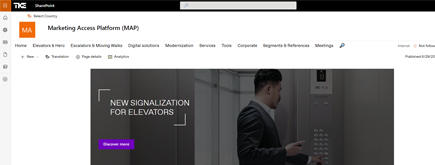
TKE SharePoint rebranding
TKE, a global elevator leader, consulted with NIFTIT to overhaul their SharePoint site for the Asia Pacific team. Enhanced search, mobile usability, and multilingual interface ignited innovation.
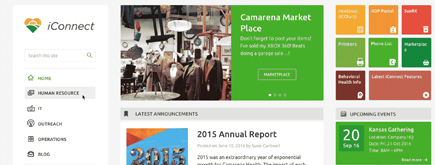
Camarena Health
NIFTIT's expertise in advanced UI/UX design combined with the functionality of Microsoft 365 transformed Camarena Health's digital landscape, driving efficiency and engagement.
The New York Metropolitan Transportation Council (NYMTC)
Discover how NIFTIT improved data access and enhanced collaboration for NYMTC by leveraging SharePoint, optimizing data connections, and orchestrating business automation workflows.
NIFTIT LLC
85 Delancey St, 2nd Floor, New York, NY 10002, USA 1-848-272-0977
Copilot Pay-As-You-Go: Billing Policies Without Licensing Everyone
By
 Khoa Q.
Published 2 hours ago
~6 minute read

Most organizations want their people to use Microsoft Copilot. Far fewer want to pay for a full Microsoft 365 Copilot license for every employee on day one. For a company with a few hundred staff, where only some roles will get daily value from Copilot, that is a real budget conversation.
There is a middle path. Microsoft lets you make agents available to employees who have no paid Copilot license, and bill the usage to your organization through a billing policy. You pay for what gets used instead of for every seat. This article explains how that model works, what you need before you start, and how to set up pay-as-you-go step by step.
Licensed access vs. usage-based access
There are two ways an employee can use an agent that you build and publish.
Licensed access. The user has a Microsoft 365 Copilot license. They can use the agent once it has been shared with them and your admin policies allow it. This is the simplest model, and the best fit for people who use Copilot all day.
Usage-based access. The user has Microsoft 365 but no paid Copilot license. They use the agent through Microsoft Copilot Chat, and your organization pays for the usage through a billing policy or prepaid capacity. The employee needs nothing extra assigned to them.
There is also a free baseline. Without any billing set up, an unlicensed user is limited to basic agents that rely on instructions and public websites. As soon as an agent needs more, such as organizational knowledge from SharePoint or actions through tools, it needs one of the two paid routes above. What your agent can do decides which category it falls into.
A useful example is an HR assistant that answers policy questions from documents on SharePoint. Every employee may ask it a question a few times a year. A license per employee is hard to justify for that. Metered usage is a much better match.
Access and billing are separate decisions
This is the point that causes most confusion, so it is worth stating plainly: publishing an agent does not give everyone in your organization access, and enabling billing does not give anyone access either.
Two things must both be true for a user to get an answer:
- They are allowed to use the agent. You control this by sharing it with specific people or groups, or making it available organization-wide, subject to your admin policies. Some tenants also require admin approval before an agent is distributed.
- Their usage can be billed. They either hold a Copilot license or fall inside a billing policy that covers them.
Document security is a third layer that never changes. If your agent uses SharePoint content, users only receive information from files they already have permission to open. The agent does not widen access. This is also why a permissions review matters before you roll an agent out. Our article on SharePoint Advanced Management covers how to find and reduce oversharing first.
What you need before you start
For the pay-as-you-go route, confirm the following:
- An admin role. Billing Administrator, AI Administrator, or Global Administrator.
- An Azure subscription in the same tenant. The billing policy attaches to it.
- A resource group to hold the billing resources.
- Owner or Contributor permissions on that subscription and resource group.
- A pilot group. A security group of the employees you want to cover first.
Role names and requirements can change, so check Microsoft's current documentation for your tenant before you begin.
Step by step: set up pay-as-you-go
1. Create the billing policy
In the Microsoft 365 admin center, go to Copilot, then Billing & usage, then Billing policies, and select Add a billing policy.
Choose your Azure subscription and resource group, and give the policy a name that says what it is for, for example "HR Agent Pilot". Scope it to the pilot users or group, set a budget notification, and create the policy.
Read the next sentence before you rely on that budget: the notification sends alerts, but it does not stop spending. Treat it as a warning light, not a cap.
2. Connect the policy to Copilot Chat
Still in Billing & usage, open Pay-as-you-go services and select Microsoft Copilot Chat. Choose the billing policy you just created, set its connection status to Connected, and save.
SharePoint agents have their own separate service setting. If you plan to use them as well, enable that service too.
3. Publish and share the agent
Open your agent, configure its Microsoft 365 Copilot channel, and grant the pilot group permission to use it. If your organization requires admin approval for agents, complete that step now. A billing policy on its own does not make the agent appear for anyone.
4. Test as a real employee
Ask someone from the pilot group who has no paid Copilot license to open the shared agent and ask a question. You want to confirm three things:
- The agent opens and answers.
- Consumption appears in the Copilot usage reports.
- The answers only draw on documents that person is supposed to see.
Use a real unlicensed account for this test. Testing with your own licensed account proves nothing about the experience your employees will have.
An alternative that avoids Azure
If you would rather not attach Azure billing, there is a prepaid route. You buy Copilot Studio capacity, create a credit policy for the selected users under the Copilot Chat billing settings, and then allocate credits in the Power Platform admin center under Licensing, then Copilot Studio, then Manage capacity. A Global Administrator must activate the capacity usage.
Employees still do not need individual Copilot licenses. The trade-off is that you commit to capacity up front, which suits organizations that want a predictable monthly figure more than a variable bill.
Keeping cost under control
Pay-as-you-go is cheap when usage is low and can surprise you when it is not. A few habits help:
- Start small. Scope the first policy to a pilot group, not the whole company.
- Watch the usage reports weekly for the first month, so you learn what a typical employee actually costs.
- Review in Azure Cost Management as well, since the charges land on your Azure subscription.
- Keep agent design tight. Agents that call many tools or knowledge sources per question consume more than a simple instruction-based one.
- Set a decision point. If a group of people ends up using Copilot daily, compare the metered cost to a license for those people. Heavy users are usually cheaper on a license, and light users are usually cheaper on usage.
Current rates and how usage is measured change over time, so use Microsoft's published pricing when you build your estimate rather than numbers from an article.
Common mistakes
Assuming budget alerts are a spending limit. They are not.
Assuming publishing equals access. Sharing and billing are separate steps, and both are required.
Skipping the permissions review. An agent that reads SharePoint will faithfully repeat whatever a user is allowed to see, including content that was overshared years ago.
Testing only with an admin or licensed account. Always test as the unlicensed employee you are building this for.
Where this fits
For most small and mid-sized organizations, the practical answer is a mix. Give full Copilot licenses to the people who work in it every day, and use billing policies to put purpose-built agents, such as an HR or IT help assistant, in front of everyone else. You get broad reach without paying for seats that would sit idle.
If you are planning an agent rollout and want help with billing policy design, permissions cleanup, or a pilot, talk to NIFTIT. We can set up the pilot, measure real usage, and give you a clear view of what the full rollout will cost.