
Discover
What we do
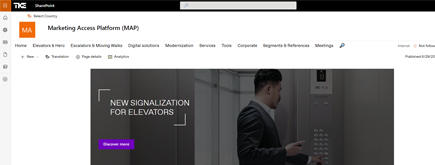
TKE SharePoint rebranding
TKE, a global elevator leader, consulted with NIFTIT to overhaul their SharePoint site for the Asia Pacific team. Enhanced search, mobile usability, and multilingual interface ignited innovation.
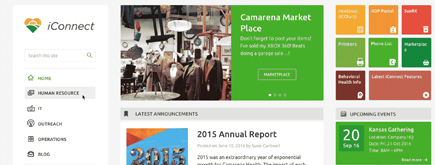
Camarena Health
NIFTIT's expertise in advanced UI/UX design combined with the functionality of Microsoft 365 transformed Camarena Health's digital landscape, driving efficiency and engagement.
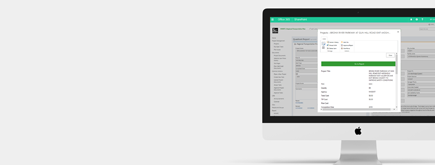
The New York Metropolitan Transportation Council (NYMTC)
Discover how NIFTIT improved data access and enhanced collaboration for NYMTC by leveraging SharePoint, optimizing data connections, and orchestrating business automation workflows.
NIFTIT LLC
85 Delancey St, 2nd Floor, New York, NY 10002, USA 1-848-272-0977
SharePoint Advanced Management: What Copilot Includes
By
 Khoa Q.
Published 2 hours ago
~3 minute read

Microsoft 365 Copilot respects the permissions already in place. That is good news for security and bad news for tidiness: if a file is shared too broadly today, Copilot can surface it to anyone who has access, in seconds. SharePoint Advanced Management (SAM) is Microsoft's toolkit for finding and fixing that problem, and many organizations already own it without knowing.
The short answer on licensing
SAM is sold as a standalone add-on (SharePoint Advanced Management Plan 1). Microsoft also includes its features for tenants that have at least one Microsoft 365 Copilot license. In that case you do not need to assign a separate SAM license to every user to start using the tools.
Licensing terms change, so confirm the current rules in the Microsoft 365 admin center and Microsoft's licensing documentation before you plan around them. The sections below describe what SAM does, which is stable regardless of how it is packaged for you.
What you get
Data access governance reports. Found in the SharePoint admin center under Reports, these show where oversharing is concentrated: sites with the most sharing links, content shared with everyone in the organization, and files carrying sensitivity labels. They are the fastest way to see your real exposure.
Site access reviews. Instead of an admin chasing permissions site by site, site owners are asked to review and confirm who has access to their own content.
Restricted access control. Limits a site to members of a specific group, regardless of how broadly items inside it were shared.
Restricted content discovery. Keeps a site's content out of organization-wide search and out of Copilot answers, without changing who can open it. Useful for sensitive sites that cannot be cleaned up quickly.
Site lifecycle policies. Identify inactive sites and prompt owners to confirm or archive them, so stale content stops feeding search and Copilot.
Conditional access and block download policies. Apply stricter controls to sensitive sites, such as requiring a compliant device or preventing downloads from the browser.
Change history and recent actions. A record of administrative changes, which helps with troubleshooting and audits.
Five things to turn on first
- Run the oversharing reports. Capture a baseline before changing anything.
- Fix the worst offenders. Start with sites shared with everyone and with broad anyone links.
- Use restricted content discovery on sensitive sites. HR, finance, legal, and executive sites are common candidates. It is a quick safety net while deeper cleanup continues.
- Start site access reviews for high-risk sites. Ownership is the hardest part of governance, and reviews put the decision with the people who know the content.
- Set an inactive site policy. Decide what happens to sites nobody has touched in a year.
Where SAM stops
SAM finds and limits oversharing. It does not decide what your content policy should be, clean up your information architecture, or replace sensitivity labels and Microsoft Purview for classifying and protecting data. It also does not fix a broken permission model by itself. A site with years of unmanaged sharing still needs a person to decide who should have access.
How we approach it
For our clients, a SAM rollout usually runs in three steps: baseline the exposure, protect the highest-risk sites immediately, then work through ownership and cleanup in priority order. That sequence lets a Copilot deployment move forward without waiting for a perfect tenant.
If you want to know what Copilot can see in your environment today, talk to NIFTIT about a SharePoint permissions and Copilot readiness review.