
Discover
What we do
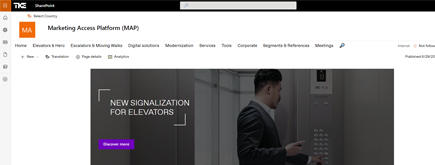
TKE SharePoint rebranding
TKE, a global elevator leader, consulted with NIFTIT to overhaul their SharePoint site for the Asia Pacific team. Enhanced search, mobile usability, and multilingual interface ignited innovation.
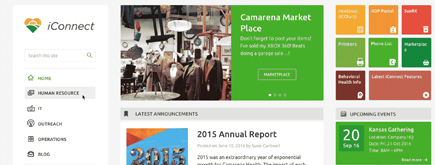
Camarena Health
NIFTIT's expertise in advanced UI/UX design combined with the functionality of Microsoft 365 transformed Camarena Health's digital landscape, driving efficiency and engagement.
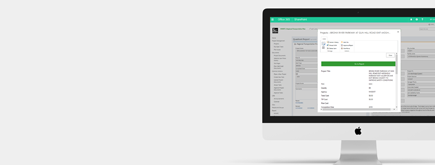
The New York Metropolitan Transportation Council (NYMTC)
Discover how NIFTIT improved data access and enhanced collaboration for NYMTC by leveraging SharePoint, optimizing data connections, and orchestrating business automation workflows.
NIFTIT LLC
85 Delancey St, 2nd Floor, New York, NY 10002, USA 1-848-272-0977
Why SharePoint Migrations Fail: Hidden Dependencies
By
 Khoa Q.
Published 9 months ago
~6 minute read

You modernized your SharePoint homepage. It looks great. Then users try to submit a request, run an approval, or access their daily list—and they're right back in classic experiences. Sound familiar?
At NIFTIT, we see this pattern constantly: migrations that succeed on paper but fail in practice because they focused on moving content instead of replacing the dependencies that keep classic SharePoint alive.
The Pattern That Predicts Failure
Here's how most SharePoint modernization projects actually unfold:
Phase 1: The Good Start
- New modern homepage deployed
- Leadership loves the clean look
- Project declared successful
Phase 2: The Reality Check
- Users click through to do actual work
- Forms don't load properly
- Workflows don't trigger
- Lists force classic view
- Navigation links lead to old pages
Phase 3: The Backslide
- Users bookmark classic pages to "get work done"
- Support tickets increase
- Adoption stalls
- "Modern SharePoint doesn't work" becomes the narrative
This isn't a training problem. It's a dependencies problem.
The 5 Dependencies That Keep Classic Alive
1. Classic Pages and Web Parts: The User Experience Trap
The problem: Even one high-traffic classic page keeps the entire experience feeling inconsistent.
Users land on your beautiful modern homepage, then click "Policies" or "Department Resources" and find themselves on a classic wiki page with classic web parts. To them, SharePoint still feels old.
What drives scope:
- Classic pages that link from modern navigation
- Script Editor and Content Editor web parts with embedded custom behavior
- Publishing pages that require page layouts and master pages
The fix: Rebuild high-traffic pages as modern pages first. Don't polish the homepage while leaving the pages users actually work in every day as classic.
2. JavaScript and CSS Injection: The Hidden Fragility
The problem: Custom scripts that modify navigation, hide elements, or enforce branding behavior.
These scripts work until they don't. They break with service updates, create security gaps, and can't be audited or governed effectively.
What drives scope:
- Site-level custom actions injecting scripts
- JSLink and legacy rendering customizations
- Alternate CSS files overriding default styles
- Embedded scripts in classic web parts
The fix: Remove unsupported script injection entirely. Replace branding needs with modern theming. Rebuild business functionality using governed SPFx extensions when truly necessary.
NIFTIT rule: If a script exists only to make SharePoint look custom, redesign using modern patterns. If it delivers business functionality, treat it as an application and rebuild it properly.
3. Legacy Workflows: The Operational Time Bomb
The problem: Business-critical approvals and processes still running on SharePoint 2013 workflows.
These workflows represent real business operations—onboarding, provisioning, request routing, approvals. When they stop working (and they will after April 2, 2026), the impact is immediate and visible.
What drives scope:
- Workflows triggered from classic pages or custom buttons
- Complex multi-step logic with branching and escalations
- Integrations with external systems
- Undocumented business logic built up over years
The fix: Treat workflow modernization as business process redesign, not technical migration. Rebuild using Power Automate as the default. Use Logic Apps or Azure Functions for complex integrations.
Critical insight: Don't modernize site experiences while leaving legacy workflows behind. It creates a modern front-end with a failing back-end.
4. Legacy Forms: The Intake Failure Point
The problem: InfoPath forms and customized ASPX list forms that are the front door to business processes.
Forms are where structured data enters SharePoint. When they break, entire intake channels collapse and teams fall back to email and spreadsheets.
What drives scope:
- InfoPath forms still in active use (often undocumented)
- Customized NewForm.aspx, EditForm.aspx, DispForm.aspx pages
- Complex validation and conditional logic
- Multi-step submission processes
The fix: Replace InfoPath and customized list forms with Power Apps. When a form is more than data entry (multi-step, complex logic, integrations), design it as a proper application.
Deadline risk: InfoPath Forms Services will be removed after July 14, 2026. This is not negotiable.
5. Publishing Features: The Portal Rebuild Signal
The problem: Classic publishing portals with page layouts, master pages, and managed navigation.
Publishing sites combine multiple legacy dependencies in one place. They rarely translate cleanly to modern—they require architectural redesign.
What drives scope:
- Heavy reliance on page layouts and master pages
- Managed navigation structures
- Script-based branding tightly coupled to publishing templates
- Content rollup and search customizations
The fix: Treat publishing portals as rebuild projects, not migrations. Create new modern Communication sites and hubs with clean information architecture. Replace publishing navigation with hub navigation and modern patterns.
Platform change: Starting September 2025, SharePoint Online restricts classic publishing creation and disables custom scripting by default on publishing sites (temporary opt-outs only until March 2026).
Why Content Migration Alone Fails
Moving files from one library to another is the easy part. The hard part—and the part that determines whether users actually adopt modern experiences—is replacing the mechanisms that deliver those files to users.
What gets missed:
- The landing pages users visit daily
- The forms they submit weekly
- The workflows that route their requests
- The scripts that make navigation feel familiar
- The publishing structure that organizes content
When these stay classic, users follow the path of least resistance back to classic experiences—even if you've "modernized" the content.
The Assessment That Actually Predicts Success
Instead of inventorying everything, focus on the dependencies that keep classic alive:
Fast, High-Signal Checklist:
- Top user entry points - Where do users actually land and work daily?
- Classic pages and web parts - Which high-traffic pages are still classic?
- Script injection - Where is custom JavaScript or CSS being injected?
- Workflows - What business processes depend on legacy workflow engines?
- Forms - Are InfoPath or customized ASPX forms in active use?
- Publishing features - Is the site fundamentally a publishing portal?
- Lists forcing classic - Which lists and libraries still open in classic view?
This inventory takes days, not months. And it produces a prioritized backlog that leadership can actually approve.
Migrations like this are where hidden dependencies cause delays. Our Microsoft 365 migration and deployment services cover planning, execution, and go-live support.
The Sequence That Works
Don't do this:
- Modernize homepage
- Migrate content
- Declare success
- Discover users still work in classic
Do this instead:
- Identify what keeps classic alive
- Replace deadline-exposed dependencies first (workflows, forms)
- Rebuild high-traffic pages and user journeys
- Remove classic entry points
- Enforce modern list experience
- Decommission classic navigation paths
What Success Actually Looks Like
A successful modernization delivers:
- End-to-end modern journeys - Users complete their work without falling back to classic
- Removed deadline risk - No business processes depend on retiring technologies
- Reduced support burden - Fewer fragile customizations to troubleshoot
- Consistent experience - Modern pages, modern forms, modern workflows throughout
- Governance that scales - Standards that prevent new classic dependencies from creeping back in
Take Action on What Matters
Your next SharePoint modernization doesn't have to fail like the last one. The difference is focus: replace what keeps classic alive instead of just moving what's easy to move.
Three steps to start:
- Inventory the real blockers - Pages, scripts, workflows, forms, publishing dependencies
- Prioritize deadline exposure - What breaks first if you don't act?
- Pilot the hard stuff - Validate replacement patterns on representative sites before scaling
Planning a SharePoint or Microsoft 365 migration? We help teams plan, migrate, and go live without surprises. Talk to our migration team.
The goal isn't a modern-looking homepage. The goal is a modern-working environment that users actually adopt.