
Discover
What we do
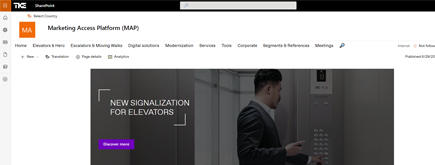
TKE SharePoint rebranding
TKE, a global elevator leader, consulted with NIFTIT to overhaul their SharePoint site for the Asia Pacific team. Enhanced search, mobile usability, and multilingual interface ignited innovation.

Camarena Health
NIFTIT's expertise in advanced UI/UX design combined with the functionality of Microsoft 365 transformed Camarena Health's digital landscape, driving efficiency and engagement.

The New York Metropolitan Transportation Council (NYMTC)
Discover how NIFTIT improved data access and enhanced collaboration for NYMTC by leveraging SharePoint, optimizing data connections, and orchestrating business automation workflows.
NIFTIT LLC
85 Delancey St, 2nd Floor, New York, NY 10002, USA 1-848-272-0977
Purview PST Export to PDF and CSV Made Useful
By
 Philac N.
Published 3 months ago
~5 minute read

Legal, compliance, and offboarding requests often start the same way: someone needs "all the email" for a mailbox, and the source of truth is Microsoft Purview eDiscovery, not the live mailbox. Purview will happily export exactly what was asked for — the problem is what you get back. A multi-gigabyte .pst file is not something a case reviewer, an auditor, or a client can just open and read through. The export is step one. The useful part is what you do with it next.
The Workflow
- Run an eDiscovery search in Purview scoped to the mailbox, date range, and keywords needed
- Export the results — Purview packages the matching items into one or more .pst files
- Download the export locally
- Run a script against the .pst to turn it into something reviewable: one PDF per email, plus a CSV of any structured data worth analyzing in bulk
Steps 1-3 are just clicking through the Purview compliance portal. Step 4 is where a script earns its keep, and it's the part worth documenting so it doesn't have to be reinvented every time.
If you need a defensible eDiscovery process for legal, audit, or offboarding requests, our Microsoft 365 security and compliance services team can run it end to end.
Why Not Just Hand Over the PST?
A .pst file requires Outlook (or a compatible client) to open, doesn't work well cross-platform, and gives a reviewer no way to skim hundreds of messages at a glance. PDFs are universal, and a CSV of relevant fields turns "reading 800 emails" into "filtering a spreadsheet." The PST is the system of record; the PDFs and CSV are the work product people actually use.
Reading the PST
Purview exports are standard .pst files, so any PST-reading tool works. On macOS/Linux, libpst's readpst does the job without needing Outlook:
brew install libpst
readpst -r -o ./eml_out -e /path/to/export.pst
The -e flag extracts each message as an individual .eml file, preserving the original folder structure. From there it's plain email parsing — Python's built-in email module reads headers, body (HTML or plain text), and attachment names from each .eml without any extra dependencies.
From .eml to PDF
Each email becomes a self-contained PDF: a header block (From, To, Cc, Date, Subject, Attachments) followed by the rendered body. Weasyprint converts the HTML body straight to PDF, so formatted emails keep their original layout, images, and tables:
python3 -m pip install weasyprint
from weasyprint import HTML
HTML(string=html_doc, base_url=eml_dir).write_pdf(out_path)
One thing worth calling out from doing this at scale: some malformed HTML bodies can crash the PDF renderer outright — not raise a catchable Python exception, but take down the whole process. Running each conversion in its own subprocess means one bad email can time out or crash without losing progress on the other 799. It also means the batch can run in parallel across CPU cores instead of one email at a time, which is the difference between minutes and hours on a few hundred messages.
Pulling Structured Data Into a CSV
PDFs are for reading one email at a time; a CSV is for everything at once. If the mailbox contains anything with a consistent structure — receipts, notifications, transaction confirmations, alerts — a regex pass over the email body can extract the fields that matter (date, amount, sender, reference number) into rows a spreadsheet or BI tool can filter, sum, and chart.
The pattern is simple: strip HTML tags down to plain text, then match against a handful of known templates the sender uses. Real-world exports often mix locales or template versions, so it pays to check for more than one pattern per field rather than assuming every message looks the same.
A Concrete Example
For a mailbox migration where the client's email was mostly Grab ride-hailing receipts, the finished pipeline was one script, run against the Purview-exported .pst:
python3 pst_to_pdf_and_csv.py /path/to/export.pst /path/to/output_dir
That single command:
- Extracts the .pst into .eml files
- Converts every email to a PDF (parallelized, one email crashing doesn't stop the batch)
- Parses each email for a date and a paid amount, writing them to a CSV
- Cleans up the intermediate .eml files afterward
Run against an 855-email export, it produced 855 PDFs and an 855-row CSV in a few minutes, with zero conversion failures. The script is also idempotent — rerunning it against the same output folder skips PDFs that already exist, so a later Purview export covering additional date ranges can be layered on without redoing prior work.
Lessons Learned
Isolate risky conversions: a native library crash inside a PDF renderer can kill an entire batch job silently. Running each unit of work in its own subprocess turns a fatal crash into a logged, skippable failure.
Parallelize once correctness is proven: get the single-threaded version working and verified first, then fan it out. Debugging a crash across six concurrent workers is much harder than debugging it in a simple loop.
Don't assume one template: real mailboxes mix languages, currencies, and email template versions over time. Build extraction patterns that check multiple known formats rather than hardcoding one.
Make it incremental: name output files predictably (e.g. by date and subject) and skip ones that already exist. This turns "redo the whole export" into "add the new emails," which matters when a legal hold or investigation scope expands later.
Handling a legal hold, audit, or mailbox export request? We can set up the Purview search and deliver results in a format reviewers can use. Talk to our compliance team.